
To distribute a self-published book to every major online retailer, most authors use a combination of direct uploads (like Amazon KDP) and aggregators or trade distributors (like Draft2Digital or IngramSpark) to reach all channels without creating duplicate listings.
Quick-start setup for most authors
KDP: Upload direct to Amazon for maximum control on the largest retail platform.Draft2Digital: Distribute to Apple Books, Kobo, Barnes & Noble, libraries, and other retailers from one dashboard.
IngramSpark: Add if you want bookstore and library ordering through the trade network.
Golden rule: Never send the same retailer from two sources. If you use KDP for Amazon, turn off Amazon in your aggregator settings. The no-duplicates rule Before diving into platforms, understand this core principle: use one distribution source per retailer. Duplicate listings create customer confusion, split your reviews, and can trigger retail account issues. Pick one “source of truth” per retailer: If you upload direct to Amazon via KDP, don’t also distribute to Amazon through an aggregator. If your aggregator distributes to Apple Books or B&N, don’t also upload direct there unless you’ve explicitly opted out in the aggregator. After publishing, search major retailers for duplicates and request merges if needed.
Page Publishing full-service distribution
Full-service book distribution means one publishing partner manages editing, design, production, and multi-channel distribution so you don’t have to juggle multiple platforms, file standards, and vendor timelines.
If you want “self-publishing made easy,” Page Publishing positions itself as an author-centric, end-to-end option—starting with a guided intake and continuing through production and retailer availability. You can review what that looks like in Page Publishing’s publishing services and begin the process through their manuscript submission page.
What a full-service path typically covers:
- Manuscript intake + planning with a dedicated coordinator (scope, formats, timeline)
- Editing coordination so the manuscript meets retail expectations
- Cover + interior design aligned with retailer requirements
- Multi-format production (print + eBook; audiobook varies by package)
- Distribution + marketing support so availability is paired with visibility
For an overview you can share with authors, Page Publishing also provides an eBrochure (PDF), and if you’re thinking about promotion after distribution, their social media post ideas for authors is an easy next-step resource. (If you want a concrete example of publicity output, here’s a sample press release PDF.)
Key benefits
- All-in-one support: editing, design, production, and distribution managed through a single partner, positioned as a “complete publishing solution.”
- Dedicated guidance: you’re assigned a Publication Coordinator and get visibility via an author portal/workflows.
- Simplifies multi-format + multi-channel rollout: reduces the operational load vs managing multiple dashboards and vendors.
Key limitations / watch-outs
- Less granular platform control than direct retailer uploading (metadata/testing changes may flow through the service process).
Amazon Kindle Direct Publishing
Kindle Direct Publishing (KDP) is Amazon’s self-service platform for publishing eBooks and print books sold through Amazon.
KDP checklist:
- Choose eBook pricing that fits the royalty tier you want (and confirm delivery-cost rules if you’re aiming for higher royalties).
- For print, confirm trim size, bleed, margins, and cover/spine specs before uploading.
- Decide whether you’ll use any exclusivity options (and understand how that affects “wide” distribution).
Key benefits
- Direct access to Amazon: publish where a large share of online book buying happens.
- Multiple formats: KDP supports eBook, paperback, and hardcover.
- Fast iteration: direct control over Amazon metadata, pricing tests, and updates.
Key limitations / watch-outs
- Amazon-only distribution: KDP does not distribute your book to competing retailers (Apple Books, Kobo, etc.)—you’ll need a “wide” plan for those.
- No audiobook publishing via KDP: audiobook distribution requires separate tools/services (outside KDP).
- Exclusivity programs can restrict “wide” eBook strategy (if you choose them).
IngramSpark
IngramSpark is a publishing/distribution platform that connects print (and eBook) titles to retailers, libraries, and bookstores through a trade-facing network.
IngramSpark checklist:
- Upload print-ready interior and cover files that match the platform’s requirements.
- Set wholesale discount and returns policies strategically (these can influence bookstore/library ordering).
- Use IngramSpark when your priority is wider availability beyond Amazon, including trade channels.
Key benefits
- Trade-oriented distribution reach: positioned for broad availability through Ingram’s global network and retail relationships, including international printing/distribution options
- Format support for wide goals: often used when authors want reach beyond Amazon, including bookstores and libraries.
- Ebook compensation: IngramSpark states you earn 85% of net revenue received by IngramSpark on eBook sales
Key limitations / watch-outs
- Complexity: more settings (discounts/returns/market pricing) can create margin surprises if set incorrectly.
- Availability ≠ active selling: distribution can make a book orderable, but it doesn’t automatically create visibility or bookstore buy-in
- Fees can apply depending on program/updates (build pricing assumptions carefully and keep an eye on announced changes).
Draft2Digital
Draft2Digital (D2D) is an aggregator that distributes your book to multiple retailers and library platforms from one upload, usually taking a percentage of sales rather than charging upfront.
D2D checklist:
- Decide which retailers you want to manage directly vs. through D2D.
- If you publish direct to Amazon via KDP, make sure your aggregator settings don’t also feed Amazon (to prevent duplicates).
- Standardize metadata across every store (title/subtitle, series fields, keywords, categories).
Key benefits
- No upfront cost + simple pricing: D2D states its fee is about 10% of list price, and there’s no up-front charge for services like distribution and sales tracking.
- “Go wide” distribution: D2D says it distributes eBooks and paperbacks to major retailers worldwide and lets authors opt in/out by storefront
- Wide + clean routing: good for avoiding manual uploads everywhere (as long as you map retailers correctly).
Key limitations / watch-outs
- Commission reduces net per-sale vs going direct to every retailer.
- Not always ideal if you want retailer-specific promo tools everywhere (some promos require direct accounts).
- Scope varies by format/channel: confirm exactly which channels you’ll use D2D for (and which you’ll keep direct) before uploading.
Smashwords
Smashwords is an eBook publishing and retail ecosystem that is now part of Draft2Digital, meaning many authors treat it as connected to the broader D2D distribution workflow.
Smashwords checklist:
- If you use D2D, confirm whether Smashwords is enabled as a storefront channel for your title.
- Keep metadata identical across platforms to avoid fragmented listings.
Key benefits
- Storefront brand remains: D2D states Smashwords remains the brand for the Smashwords Store while D2D houses the publishing/distribution functions.
- Works well inside a D2D-wide strategy (one ecosystem for distribution + an additional storefront presence).
Key limitations / watch-outs
- Not a separate “primary aggregator” anymore: the older “Smashwords distributes everywhere except Amazon” framing should be updated—distribution is handled through Draft2Digital, with Smashwords as the store brand.
- Potential for confusion/duplicates if authors try to treat Smashwords and D2D as separate distribution pipelines.
Lulu
Lulu is a self-publishing platform known for print-on-demand with optional retail distribution paths.
Lulu checklist:
- Confirm ISBN requirements for the distribution tier you want.
- Compare print costs and margins before enabling broad retail distribution.
- Use Lulu when customization and print flexibility are priorities.
Key benefits
- Retail channel availability: one overview notes Lulu titles can be available on Lulu, Amazon, IngramSpark, and Barnes & Noble. Launch My Book
- Higher royalties on Lulu sales (per that overview): 50% for books sold on Lulu. Launch My Book
- Global Distribution Network: Lulu states its network makes books available on Amazon/other retailers and creates a listing with Ingram for bookstore ordering. Lulu Help Center
Key limitations / watch-outs
- ISBN requirement for global distribution eligibility: Lulu explicitly states an ISBN is required. Lulu Help Center
- Cost/traffic concerns: the same overview cites slightly higher printing costs, low traffic, and higher distribution fees as cons. Launch My Book
- Formatting constraints: Lulu notes specific eligibility requirements (e.g., EPUB + English for eBook distribution). Lulu Help Center
Barnes & Noble Press
Barnes & Noble Press is B&N’s self-publishing platform for selling directly to Barnes & Noble’s customer base.
B&N Press checklist:
- Use it when you want direct control inside the B&N ecosystem (pricing, updates, product page).
- If an aggregator already distributes to B&N, choose one route (direct or aggregator) to avoid duplicates.
Key benefits
- No exclusivity / no hidden fees: B&N Press emphasizes author control and no exclusivity requirement. B&N Press
- Strong eBook royalty: B&N Press terms state 70% royalty on the eBook list price. B&N Press
- Print royalty clarity: B&N Press help docs state print royalties are 55% of list price minus printing cost. B&N Press
Key limitations / watch-outs
- Ecosystem-limited reach: you’re primarily selling to B&N customers; it’s not a full “all retailers” solution by itself. B&N Press
- In-store placement isn’t automatic: physical shelf presence is typically selective and performance-driven (set expectations accordingly).
BookBaby
BookBaby is a publishing services provider and distribution option that offers production add-ons (editing/design) and distribution, plus its own storefront options.
BookBaby checklist:
- Decide whether you’re using BookBaby mainly for services, distribution, or both.
- Compare upfront package costs against DIY tools based on budget and speed.
Key benefits
- Direct-to-reader high royalties on Bookshop: BookBaby lists up to 85% for eBooks, up to 50% for print, and 75% for audiobooks sold on Bookshop.
- Author promo tools + “always in stock” POD: Bookshop highlights coupon tools and POD availability.
- Services + distribution option: can bundle editing/design/production support with distribution needs.
Key limitations / watch-outs
- Upfront package costs can be higher than DIY platforms (tradeoff for bundled service).
- Timelines can vary when multiple service components are bundled (set realistic launch expectations).
- Extended timelines due to outsourcing
PublishDrive
PublishDrive is a distribution platform that uses a subscription model (rather than taking a percentage cut), with an emphasis on global reach and additional promotional tools.
PublishDrive checklist:
- Estimate monthly sales volume to determine whether a subscription will pay off.
- Confirm which international, library, and (if relevant) audiobook outlets matter for your audience.
Key benefits
- Commission-free model: PublishDrive promotes 0% revenue share and keeping 100% of royalties under flat subscription pricing.
- Scales for higher volume: subscription can become advantageous as catalog and sales grow. Self-Publishing Hub
Key limitations / watch-outs
- Subscription risk for low volume: if sales are sporadic, the monthly fee may outweigh the benefit. Self-Publishing Hub
- Requires active catalog management (store selection, pricing, metadata, promos) to justify the fee.
Preparing your manuscript for distribution
Retail-ready formatting means your interior files meet each platform’s technical specs so uploads don’t fail and readers get a professional experience.
Manuscript prep checklist:
- Edit first, format second (formatting won’t fix structure/clarity problems).
- Export correctly: EPUB for most eBooks; print-ready PDF for most print platforms.
- Standardize chapter styles, spacing, scene breaks, and font handling.
- Write a strong blurb and author bio (these become store-page assets).
If you want a guided option that bundles prep with production and distribution, Page Publishing frames this as part of its full-service publishing support—starting from initial manuscript submission.
Designing a professional book cover
Retail-compliant cover design means your cover file meets resolution/spec requirements and communicates genre clearly at thumbnail size.
Cover checklist:
- eBook cover: confirm required dimensions/ratio and minimum resolution.
- Print cover: calculate spine width accurately using final page count and paper choice.
- Make sure title/author name remains readable on mobile thumbnails.
- Match genre expectations so browsers instantly understand what the book is.
Setting pricing and royalties strategically
Royalties are the portion of each sale paid to the author after the retailer/distributor takes its share (and after print costs for physical books).
Pricing checklist:
- Build a pricing grid by format (eBook, paperback, hardcover, audiobook).
- Confirm each platform’s royalty structure and eligibility rules.
- Decide whether you’re going exclusive anywhere (that choice can limit “wide” reach).
Uploading your book to multiple platforms
A wide distribution workflow is a repeatable process for publishing to multiple retailers without duplicate listings, inconsistent metadata, or conflicting ISBN usage.
Upload checklist
- Confirm final files (interior + cover) match each platform’s specs.
- Standardize metadata everywhere (title/subtitle punctuation, author name, series fields, keywords, categories).
- Use one ISBN strategy consistently.
- After publishing, search major retailers for duplicates and request merges if needed.
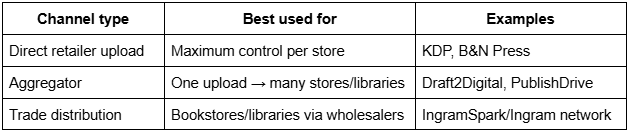
Coverage map (quick reference)
Marketing your book after distribution
Post-publication marketing is the system of actions that drives discovery and sales after your book is live (distribution creates availability; marketing creates demand).
Marketing checklist:
- Optimize metadata and store copy (description, keywords, categories).
- Build a review plan (ARCs, launch team, newsletter asks).
- Use social media, email, and targeted promos (don’t rely on “being listed” alone).
- Monitor and respond to reviews professionally.
If you want a ready-to-use content starter, Page Publishing’s social media post ideas for authors can help authors promote consistently once distribution is in place.
Frequently asked questions
Common questions below focus on practical “wide” setups that avoid duplicates.
How do I distribute my self-published book to every major online retailer?
Use a combination of direct retailer uploads and aggregators. Most authors publish direct to Amazon via KDP, then use Draft2Digital or IngramSpark to reach Apple Books, Kobo, Barnes & Noble, and library systems.
What is the best platform for self-publishing a book?
Amazon KDP is the most popular platform because it offers direct access to Amazon’s massive customer base. However, most authors use KDP alongside an aggregator like Draft2Digital to reach readers on other retailers like Apple Books and Kobo.
What is the difference between IngramSpark and KDP?
KDP distributes only to Amazon, while IngramSpark distributes to bookstores, libraries, and other retailers through the Ingram wholesale network. Many authors use both: KDP for Amazon sales and IngramSpark for trade distribution and wider retail reach.
What is the difference between direct upload and using an aggregator?
Direct upload gives you more control but requires more admin work. Aggregators let you reach multiple retailers from one dashboard but typically charge a percentage of sales and may limit access to retailer-specific promotional tools.
How much do self-publishing distributors charge?
Costs vary by platform. KDP and B&N Press are free with no upfront fees. Draft2Digital takes about 10% of list price. IngramSpark may charge setup or annual fees depending on your plan. PublishDrive uses a flat monthly subscription instead of a percentage.
Do I need an ISBN to sell on Amazon?
No. Amazon provides a free ASIN for KDP eBooks and a free ISBN for KDP print books. However, if you want wider distribution or consistent branding across retailers, purchasing your own ISBN gives you more control.
Do I need to buy my own ISBN for wider distribution?
Yes, in most cases. Platforms like IngramSpark and Lulu require an ISBN for global distribution. Using your own ISBN (rather than a free platform-assigned one) ensures you’re listed as the publisher of record across all retailers.
How can I avoid duplicate listings on retailers?
Use one distributor per retailer. If you go direct to Amazon with KDP, don’t also send Amazon via an aggregator.
Can I distribute print and eBook versions through the same channels?
It depends on the platform. KDP handles both eBook and print for Amazon. Draft2Digital supports both formats for wide distribution. IngramSpark handles both but is primarily used for print. Always confirm format support before uploading.
