
If you’re asking, “Where can I find free resources to publish my book online?”, you’re in luck. Between free self-publishing platforms, no-cost writing and formatting tools, and thriving author communities, you can move from manuscript to marketplace with minimal spend, upgrading to paid help only where it truly matters.
How publishing has changed (and why it’s easier now)
Book publishing has shifted dramatically in the last decade. Digital storefronts, print-on-demand (POD), and online creator tools have made it possible to publish professionally without upfront printing costs, while author communities and free education platforms help you learn the process faster and avoid common mistakes. In short: you can build a high-quality publishing workflow with mostly free tools, then add professional support only when you want more guidance, speed, or polish.
Key terms you’ll see in this guide
- Self-publishing: Self-publishing means releasing and distributing your book without a traditional publisher, giving you full rights, higher royalties, and creative freedom.
- Royalties: The percentage of each sale you receive as the author (after retailer/printing costs, depending on the platform).
- Distribution network: The retailers and libraries where your book can be listed (Amazon, Apple Books, Google Play Books, Kobo, B&N, library vendors, etc.).
- Publishing aggregator: A service that lets you upload once and distribute to multiple retailers from one dashboard.
- Exclusivity: A requirement that your ebook can only be sold through one retailer/program during enrollment.
- Serialization: Publishing a story in episodes/chapters over time (common in community-first platforms).
Quick-stat snapshot: what the major “free” platforms are best at
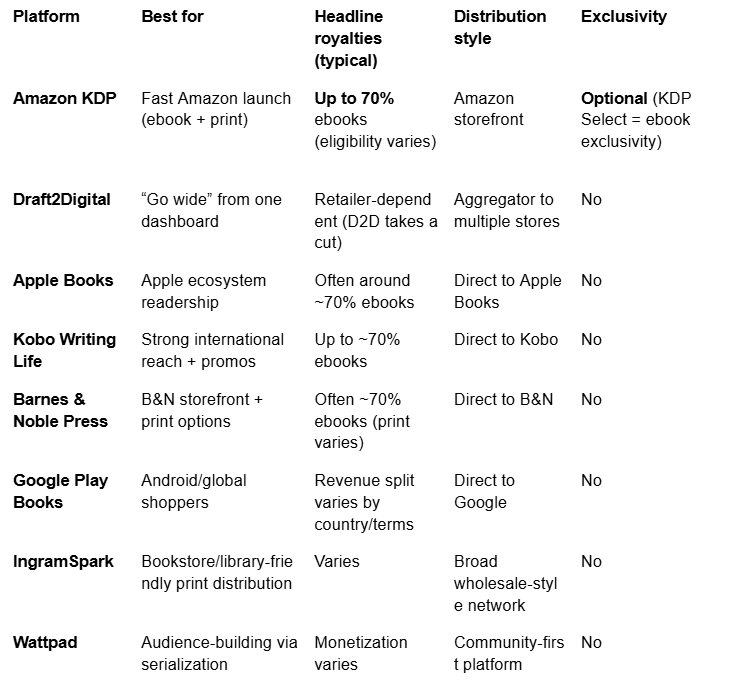
(Percentages/rates can change by region, pricing, and program rules. Always confirm inside the platform before publishing.)
Page Publishing: Comprehensive Hybrid Publishing Support
Hybrid publishing combines the professional standards of traditional publishers with the flexibility and control of self-publishing, allowing authors to pay for services while keeping their rights.
For authors who want more than a DIY experience, but still want creative ownership, Page Publishing positions itself as a full-service hybrid publisher that bridges the gap between traditional publishing expertise and self-publishing flexibility. This middle-ground approach is designed for writers who want hands-on guidance, clear deliverables, and a supported workflow, without giving up control of their book.
End-to-end services with a guided, author-first process
Page Publishing’s hybrid model is built around end-to-end support across the publishing journey, including:
- Editing and manuscript development
- Cover and interior design
- Production and print preparation
- Distribution setup and retail availability
- Marketing support and ongoing communication
Learn more about what’s included: https://pagepublishing.com/services/
Author rights, creative ownership, and transparent support
A common concern is whether a publisher will limit your creative control or ownership. Page Publishing emphasizes preserving author rights and creative ownership, along with transparent pricing and clear support, so authors understand what they’re receiving and remain actively involved throughout the process.
Personalized guidance: Publication Coordinator + portal workflow
If you want step-by-step support, Page Publishing highlights a Publication Coordinator system and an online portal workflow to help keep the process organized and trackable.
See how the process typically works:
- https://pagepublishing.com/what-to-expect-when-working-with-page-publishing/
- https://pagepublishing.com/distribution-marketing/
Getting started (manuscript workflow)
If you’re ready to explore hybrid support and want a clear next step:
https://pagepublishing.com/manuscript-submission/
Free self-publishing platforms
A self-publishing platform is a website or service that lets you publish and distribute your book online, often at no upfront cost, while you earn royalties on sales.Amazon Kindle Direct Publishing (KDP)
Amazon KDP is a leading choice for free online publishing because it can list your ebook and print book on Amazon, offers headline ebook royalties up to 70% (for eligible books/territories), and provides access to Amazon’s global customer base.Why authors choose KDP
- Massive storefront reach (Amazon discovery + search visibility)
- Flexible royalty options (35% or 70% for ebooks, depending on eligibility)
- Fast setup compared to traditional timelines
Requirements and limitations to know upfront
- The 70% rate is calculated on list price and may involve delivery fees and regional rules.
- Eligibility depends on territory, pricing, and file delivery requirements.
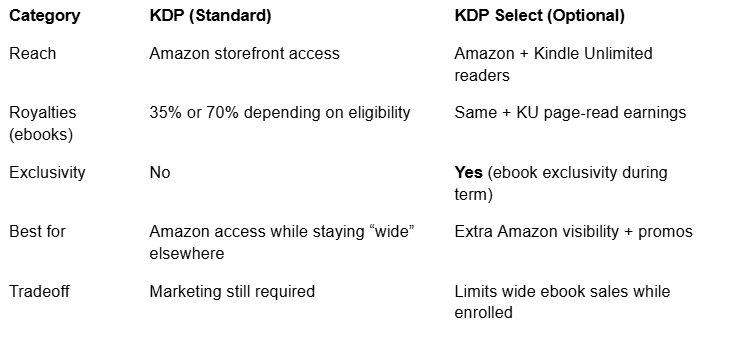
- KDP Select exclusivity: KDP Select is an optional 90-day program for Kindle ebooks (includes Kindle Unlimited and promo tools). Enrolling requires your ebook to remain exclusive to Amazon during the term.
Formatting options (what KDP accepts)
KDP supports multiple ebook formats (including EPUB and KPF) and provides preview tools to test your file before publishing. Helpful refresher: https://pagepublishing.com/book-formatting-101-common-terms-and-definitions/KDP pros/cons at a glance
What to do after your book goes live
Publishing is step one. Discoverability is step two. These Page resources can help:
- https://pagepublishing.com/book-marketing-ideas-for-authors/
- https://pagepublishing.com/promoting-your-book-on-a-shoestring-budget-tips-for-authors/
- https://pagepublishing.com/leveraging-social-media-a-guide-for-authors/
- https://pagepublishing.com/12-social-media-post-ideas-for-authors/
- https://pagepublishing.com/maximizing-local-media-coverage-tips-for-new-authors/
Draft2Digital: Simplified Multi-Platform Distribution
A publishing aggregator allows you to upload your manuscript once and distribute it to multiple online retailers, streamlining the publishing process.
Draft2Digital (D2D) is popular with authors who want to publish wide without juggling multiple retailer dashboards. It’s especially useful if you want distribution support without exclusivity.
Key Draft2Digital features
- Automatic formatting / layout tools (less technical setup for ebooks)
- Universal Book Links (Books2Read) for easier sharing across retailers
- One dashboard to manage distribution and track performance
- No exclusivity requirement
How authors typically use Draft2Digital (simple workflow)
Wide distribution means making your book available on multiple retailers (not just one storefront), so readers can buy where they already shop.
- Upload your manuscript once (instead of store-by-store uploads).
- Use D2D’s formatting tools if needed.
- Select your preferred stores (go as wide as your strategy supports).
- Create a universal book link for marketing so every post/email points readers to one place.
- Track performance and adjust over time.
Pair a “wide” approach with practical marketing:
Smashwords: Wide eBook Format Support and Retail Reach
Smashwords has long been known as an indie-friendly ebook publishing option with wide retailer reach and multi-format support, especially attractive to cost-conscious authors who want distribution beyond a single storefront.
What Smashwords helps authors do
- Distribute to multiple retailers with a “publish wide” mindset
- Expand reach into library-friendly channels (depending on distribution pathways)
- Support multiple formats/workflows tied to its formatting guidance
Pros
- Broad reach across multiple retailers/channels
- Free to publish (low barrier to entry)
- Multi-format/conversion support within its workflow
Cons
- Marketing is still largely author-led
- Smashwords was acquired by Draft2Digital in 2022, and many of its distribution functions have been folded into the D2D platform. Authors should check the current Smashwords experience directly, as features and workflows may differ from older guides you find online.
IngramSpark: Extensive Print and Digital Distribution
Distribution network: A distribution network is the system of retailers, libraries, and online platforms where your book is made available for sale or lending.
Print-on-demand (POD): POD means books are printed as orders come in, so you don’t have to buy or store large upfront inventory.
IngramSpark is often used by independent authors who want broader reach beyond a single storefront, particularly for print distribution into bookstore/library-friendly channels.
Why authors choose IngramSpark
- Print + ebook availability through broad distribution systems
- Often viewed as more bookstore/library-aligned than retail-only approaches
- Global reach options and wholesale-style pathways
Setup resources and fees to know IngramSpark offers free tools and resources to help with print specs and distribution settings. However, while initial setup may be low-cost or free during promotions, authors should plan for potential fees such as revision charges after certain windows and optional paid add-ons.
Helpful context on POD and distribution:
- https://pagepublishing.com/exploring-print-on-demand-pod-for-authors/
- https://pagepublishing.com/distribution-marketing/
Wattpad: Social Storytelling and Reader Engagement
Serialization: Serialization is the practice of publishing a story in installments, keeping readers engaged over time.
Wattpad’s signature strength is community-driven publishing. Instead of publishing into a quiet storefront, writers post directly into a social ecosystem where readers can react instantly, helping authors learn what resonates and build loyal fans over time.
How Wattpad fuels real-time engagement
- Inline comments and chapter feedback (a “live book club” feel)
- Votes and visibility signals that can boost discovery
- Serialization-friendly structure that rewards consistency
Monetization and discoverability
Wattpad is often best viewed as an audience-building channel rather than a primary revenue engine. The tradeoff is meaningful discoverability potential for authors who engage with readers and update consistently.
Reedsy: Professional Freelance Marketplace and Free Typesetting Tools
Reedsy is best known for two things: its curated freelance marketplace (for hiring pros) and its free formatting app, Reedsy Studio, for creating professional-looking book files.
Reedsy Marketplace (paid professional help)
Hire vetted editors, designers, and marketers/publicists when you want expert polish.
Reedsy Studio (free typesetting + ebook/print creation)A free online writing/formatting tool that supports exporting a print-ready PDF and an EPUB.
Free tools vs. paid services (typesetting + creation)
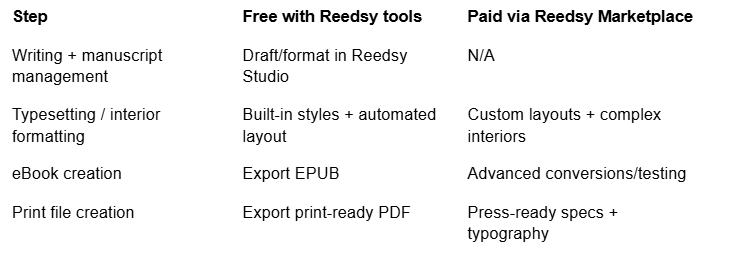
Reedsy also offers educational resources (webinars and free courses) to help authors level up.
Canva: Easy Book Cover and Promotional Design
Book cover design: Book cover design is the process of creating an appealing visual representation of your book, critical for attracting readers.
Canva is a favorite for DIY book graphics because it combines drag-and-drop simplicity with templates that look polished even if you’re not a designer.
What Canva is best for
- Book covers (ebook cover templates and print-friendly designs)
- Promotional graphics (quote cards, ads, launch posts)
- Social media banners and headers
Step-by-step: template → finished cover
- Choose a cover template that fits your genre.
- Replace title/author text and strengthen hierarchy (title biggest).
- Swap imagery and simplify layout for thumbnail readability.
- Check sizing (ebook front cover vs print specs).
- Export in the format you need (PNG/JPG for web; PDF where applicable).
Google Docs: Collaborative Writing and Editing
Google Docs is a strong free option for writing, editing, and collaboration, especially for co-authors or editors who want comments, trackable changes, and cloud backups.
Key collaboration features
- Comments + threads for feedback
- Suggesting mode (track-changes style)
- Version history to restore earlier drafts
- Permissioned sharing (viewer/commenter/editor)
Workflow tips
- Use clear version naming (Draft01, Draft02_LineEdits, Final).
- Keep editors in Suggesting mode to preserve decisions.
- Use consistent heading styles for cleaner exports.
- Export DOCX/PDF as needed for editing and publishing workflows.
Hemingway Editor: Enhancing Readability and Writing Clarity
Readability measures how easy your text is to understand, helping your message reach the widest audience.
Hemingway Editor is a simple, web-based tool that flags clarity issues (hard-to-read sentences, wordiness, passive voice) so you can tighten your prose.
Quick way to use it
- Paste a chapter in, fix the highlights, re-check the grade level, and repeat.
Grammarly: Grammar and Style Proofreading Assistance
Grammarly is a popular way to build free grammar and punctuation checks into your workflow before submission or publication.
What it helps catch
- Spelling and grammar mistakes
- Punctuation issues
- Clarity/style improvements (use selectively to preserve voice)
Best practice
Run Grammarly after your final content edit, fix the high-impact errors first, then do a final read-through for consistency.
Online communities for independent authors
Communities help you troubleshoot publishing decisions, get feedback, and stay motivated.
- Alliance of Independent Authors (ALLi): Advocacy, watchdog guidance, member resources
- OnlineBookClub.org: Reader interaction and exposure opportunities
- The Creative Penn: Education, free guides, and ongoing publishing/marketing insights
Choosing the right free resource for your goals
Selection criteria are the factors you use to choose tools and platforms, like royalties, reach, formats, and how much marketing you’re willing to do.
Checklist
- Reach: Amazon-only vs wide distribution
- Royalties: how you’re paid and when
- Formats: ebook, print, audiobook readiness
- Exclusivity: whether you can sell elsewhere
- Marketing tools: built-in promos vs DIY
- Skill level: comfort with formatting/design
- Timeline: how quickly you want to launch
Simple decision flow
- Want fast Amazon access? → Start with KDP
- Want wide retailer reach? → Add Draft2Digital or publish direct to Apple/Kobo/B&N/Google
- Want feedback + audience-building before launch? → Try Wattpad (serialization)
- Want guided support but keep control? → Compare hybrid options and review the process:
Pro tip: Most authors do best by combining tools: Google Docs (writing) + Grammarly (cleanup) + Reedsy Studio (formatting) + Canva (graphics) + KDP/D2D (distribution).
Frequently Asked Questions
What are the best free platforms to publish my book online?
Popular starting points include Amazon KDP, Draft2Digital, Apple Books, Kobo Writing Life, Barnes & Noble Press, and Google Play Books. Each offers different reach and royalty structures.
How do self-publishing royalties and distribution typically work?
Royalties are your share of each sale; distribution is where your book is listed (retailers/libraries). Each platform sets its own royalty rules, print costs, and storefront reach.
What free tools can help me prepare my manuscript professionally?
Google Docs (writing), Grammarly (cleanup), Hemingway (clarity), Reedsy Studio (formatting), Canva (covers and promo graphics).
Where can I find supportive communities for independent authors?
ALLi, KDP Community, genre-specific groups, The Creative Penn community, and reader platforms like OnlineBookClub can be great starting points.
How do I decide which free publishing resource fits my needs?
Choose based on your goals for reach, formats, exclusivity preferences, and how hands-on you want to be with production and marketing.
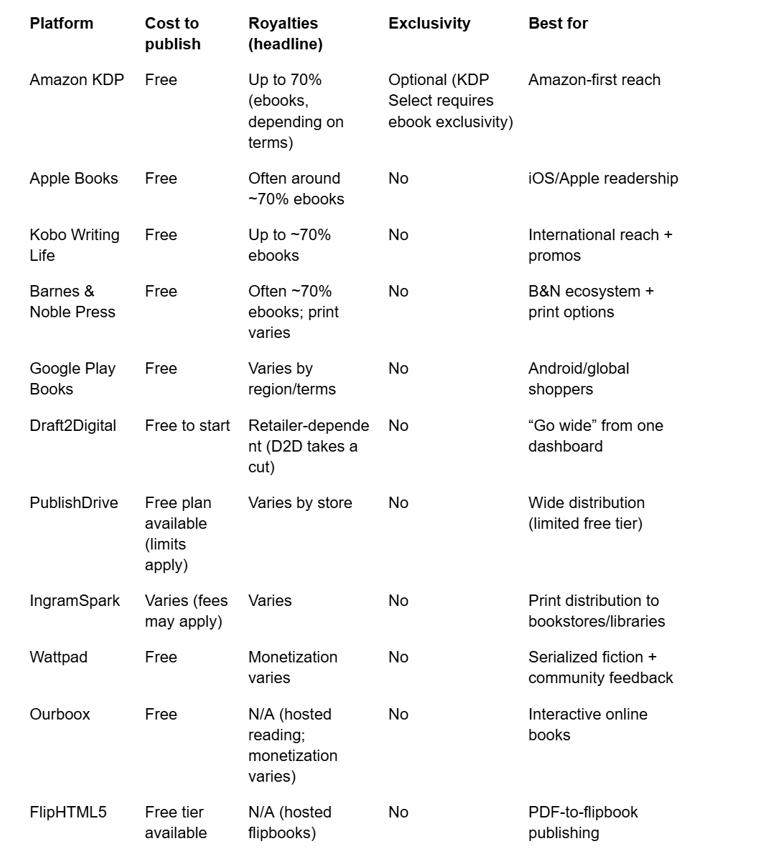
The table below includes a few additional platforms not covered in detail above. These are worth a look depending on your format or niche: PublishDrive offers wide distribution with a limited free tier, Ourboox supports interactive online book creation, and FlipHTML5 converts PDFs into hosted flipbook formats.
Platform comparison table (detailed)