How to Choose a Trustworthy Self-Publishing Service for Your First Book

woman in glasses sitting on the couch browsing on a tablet device

Understanding Your Publishing Needs

A self-publishing service is a company or platform that helps authors produce, distribute, and market their books without going through a traditional publishing house. If you are publishing your first book, clarifying your goals is the essential first step toward selecting a trustworthy self-publishing service that aligns with your vision, budget, and expectations. Before comparing self-publishing companies, authors should assess what kind of support they truly need throughout the publishing journey.

Start by listing the services you may require, such as professional editing, cover design, interior formatting, ebook and print conversion, audiobook production, distribution, and marketing support. First-time authors often underestimate how many steps are involved in publishing a book, and overlooking these needs early can lead to unnecessary delays or added costs later.

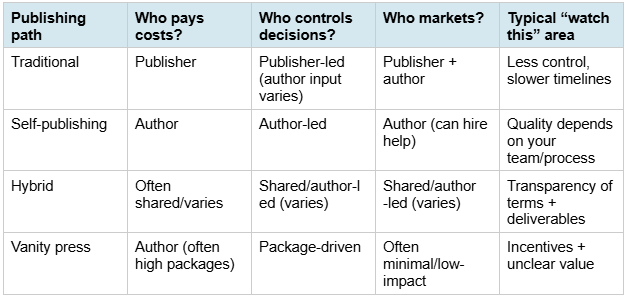
Full-service self-publishing is a publishing model in which a single company manages all aspects of book production, distribution, and promotion on the author’s behalf. This approach differs significantly from à la carte or self-service platforms, where authors coordinate individual vendors themselves.

Working with a full-service self-publishing partner like Page Publishing is especially appealing for first-time authors who want professional guidance without managing every step alone. Authors who prefer a managed approach often choose companies offering professional editing, design, and distribution services under one coordinated process rather than juggling multiple vendors.

A key differentiator of Page Publishing is its emphasis on hands-on support, including the assignment of a dedicated publication coordinator to guide authors through each phase of the publishing process.


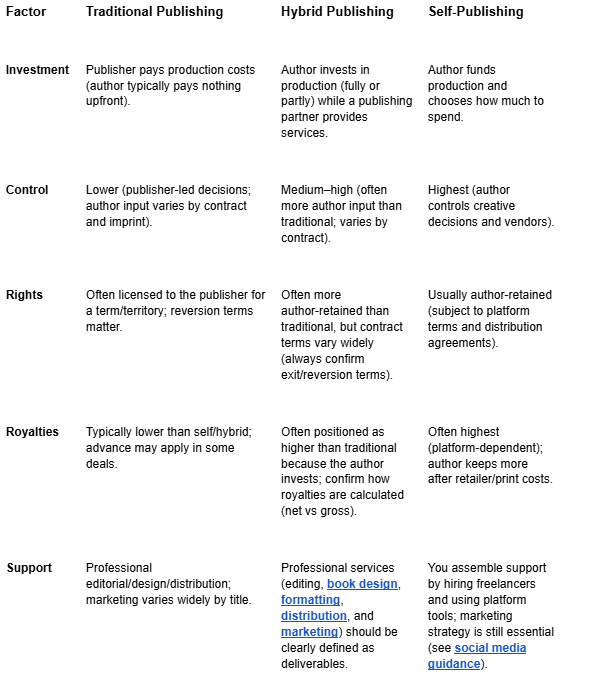
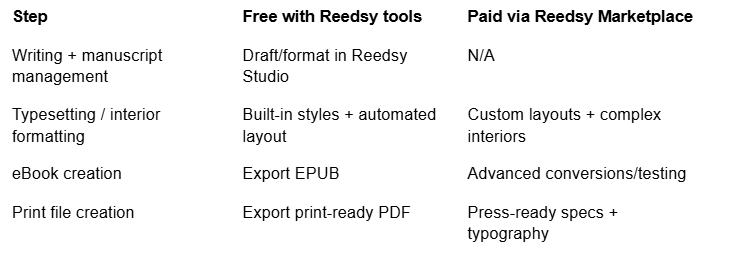
self-publishing table of included services

Working with a full-service self-publishing partner like Page Publishing is especially appealing for first-time authors who want professional guidance without managing every step alone. Authors who prefer a managed approach often choose companies offering professional editing, design, and distribution services under one coordinated process rather than juggling multiple vendors.

A key differentiator of Page Publishing is its emphasis on hands-on support, including the assignment of a dedicated publication coordinator to guide authors through each phase of the publishing process.

customer testimonial

Researching Self-Publishing Companies

A trustworthy self-publishing company is a provider with transparent pricing, verifiable author testimonials, and a track record of producing professional-quality books. Thorough evaluation of self-publishing companies helps authors avoid scams, low-quality services, and unexpected costs. When researching the best self-publishing services, prioritize transparency and author support over flashy promises.

Authors should research company backgrounds, leadership experience, and years in operation, as well as read testimonials and third-party reviews. Relying solely on a company’s website can be misleading, so cross-checking claims with external sources is essential for finding a trustworthy partner.

Creating a checklist can help streamline this research. Important factors to evaluate include:

  • Range of services offered
  • Responsiveness and accessibility of customer support
  • Years in business
  • Industry reputation

Author communities such as Kboards and Absolute Write are valuable spaces for networking and gaining unfiltered peer feedback about self-publishing companies.

An aggregator is a service that distributes a book to multiple retailers or libraries on the author’s behalf, often simplifying wide distribution but offering limited hands-on support. Understanding this distinction helps authors evaluate whether they need a full-service partner or simply a distribution channel.

Evaluating Distribution and Reach

Book distribution is the process of making a book available for purchase through retailers, libraries, and online platforms. Distribution plays a major role in a book’s visibility and long-term sales potential, so authors should examine how widely their book will be available and whether the service can reach both domestic and international audiences.

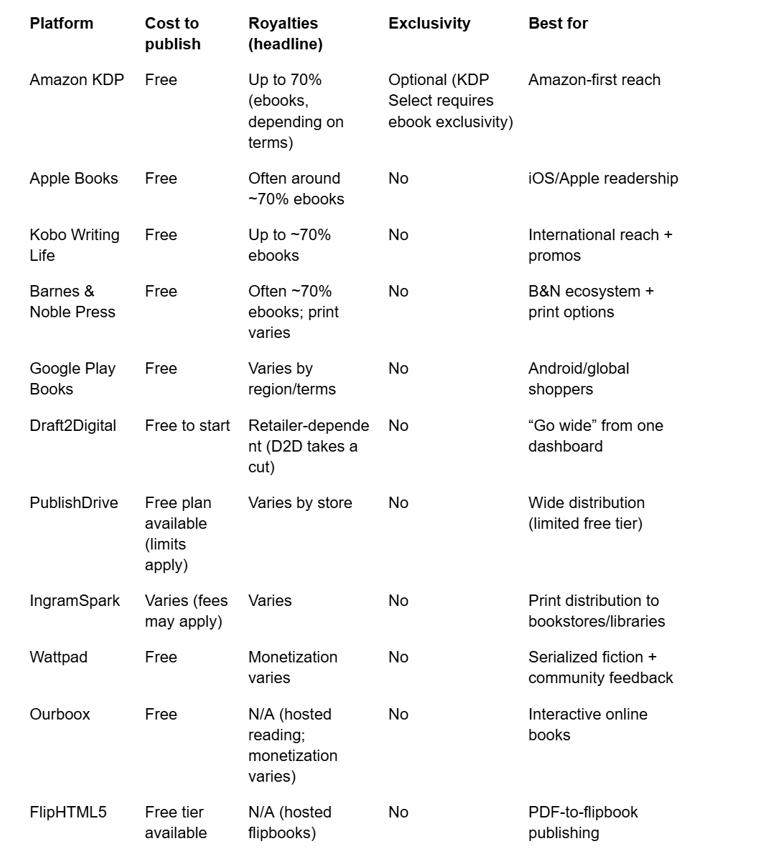
Wide distribution is the practice of making a book available across multiple platforms and retailers rather than relying on a single storefront. Compare distribution networks carefully and confirm whether the service partners with major online retailers such as Amazon, Barnes & Noble, Apple Books, and Kobo, as well as library systems.

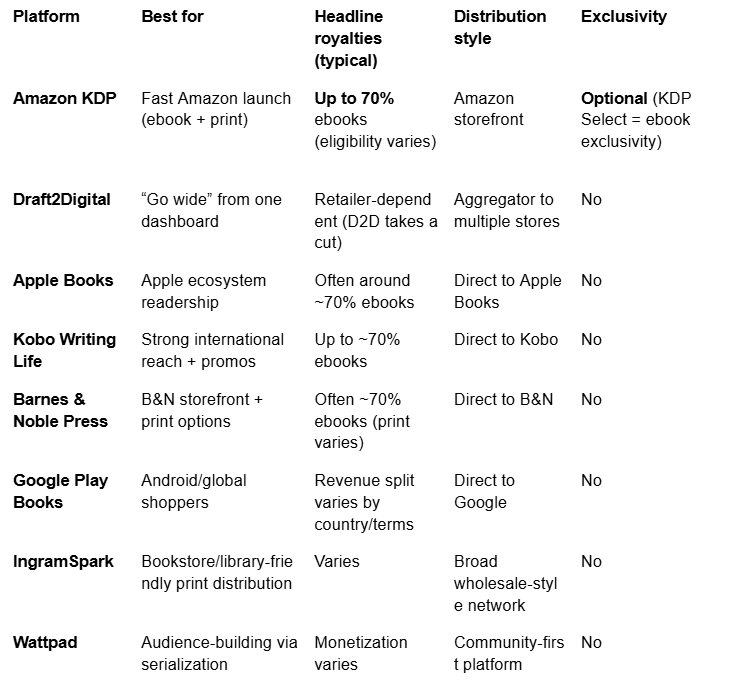
Some widely recognized distributors include Amazon KDP, PublishDrive, and Draft2Digital.

platform, format and access table for books

Understanding distribution reach helps authors choose a self-publishing service that maximizes discoverability while aligning with their marketing strategy.

Analyzing Pricing, Fees, and Royalties

A royalty is the percentage of book revenue paid to the author after each sale, typically ranging from 35% to 70% depending on platform, format, and pricing strategy. Understanding pricing structures and royalty models is essential for avoiding financial surprises. Self-publishing services generally use one or more of the following pricing approaches:

  • Upfront service fees
  • Royalty splits
  • Pay-per-service pricing
  • Hybrid models

Some full-service self-publishing providers offer publishing packages tailored to different author needs, allowing authors to understand costs upfront rather than navigating fragmented pricing.

Authors should also be cautious of platforms marketed as “free.” Understanding the true cost of “no-cost” publishing often reveals trade-offs in royalties, control, or support that may not be immediately obvious.

Clear royalty tracking tools and transparent payment schedules are important indicators of a trustworthy self-publishing service.

Reviewing Contracts and Rights Retention

Rights retention is the principle that authors maintain ownership and control of their intellectual property, including the copyright, ISBN, and decisions about where and how the book is published. Contracts determine who controls your book, making this step especially important for first-time authors publishing their first book. Always read agreements carefully and seek clarification on unclear language.

Key elements to review include:

  • Copyright ownership
  • ISBN assignment
  • Exclusivity requirements
  • Termination and exit clauses

Authors should be wary of contracts that include broad rights grabs, long-term exclusivity, or vague royalty calculations. Trustworthy self-publishing companies prioritize transparency and author ownership.

Red flags in self-publishing contracts:

  • Unclear or ambiguous copyright ownership language
  • Vague royalty calculations or undefined “net” amounts
  • Long-term exclusivity requirements (5+ years or perpetual)
  • Complicated exit clauses or termination fees
  • No clear process for rights reversion
  • Contracts that require ongoing payments to maintain availability

Assessing Quality Control and Author Support

Quality assurance in self-publishing refers to the professional standards, processes, and checkpoints that ensure a book meets industry expectations for editing, formatting, design, and production. Professional quality and reliable support are two pillars of a trustworthy self-publishing partner. High-quality books require professional editing, formatting, and design to meet reader expectations and compete effectively in the marketplace.

The Case for Professional Editing and Design

While authors can handle some tasks independently, outsourcing editing and design to professionals significantly improves the final product. Tools like Grammarly and ProWritingAid help authors polish their manuscripts before professional editing, catching basic errors and improving readability. For formatting and layout, software such as Vellum and Adobe InDesign produces publication-ready files that meet retailer specifications. These tools enhance quality at every stage, but they work best when paired with experienced human editors and designers who understand genre conventions and reader expectations.

For cover design, many authors and services use tools like Canva or Adobe Spark to create professional-looking covers, though custom designs from experienced cover designers typically outperform template-based options. For ebook conversions, Calibre remains a popular tool for formatting and file management, particularly for authors distributing across multiple platforms.

Evaluating Author Support

Equally important is access to real human support throughout the publishing process. Authors should verify that a self-publishing service offers personal guidance, timely communication, and resources for troubleshooting problems as they arise. Services that assign a dedicated publication coordinator—a hallmark of Page Publishing—offer clearer communication, accountability, and personalized guidance from manuscript submission through publication and beyond.

When evaluating support, ask:

  • Will I have a single point of contact or be passed between departments?
  • What is the typical response time for questions or concerns?
  • Are there resources available if I encounter problems with formatting, distribution, or marketing?

Quality Assurance Checkpoints

Trustworthy self-publishing services build quality assurance into their workflow. Key checkpoints include professional proofreading after layout, formatting verification to ensure files display correctly across devices, and pre-publication review to catch any remaining issues before the book goes live. These steps help ensure the final product meets professional standards and reflects well on both the author and the publisher.

Authors should ask prospective services what quality control steps are included and who is responsible for final approval before publication.

Comparing Notable Self-Publishing Platforms

A self-publishing platform is a service or marketplace that enables authors to publish, distribute, and sell their books independently. Comparing leading platforms helps authors identify the best self-publishing services for their specific goals and determine which model fits their needs.

Print-on-demand is a publishing model where books are printed only when ordered, reducing inventory costs and financial risk. Many modern platforms rely on print-on-demand to balance flexibility with professional production quality.

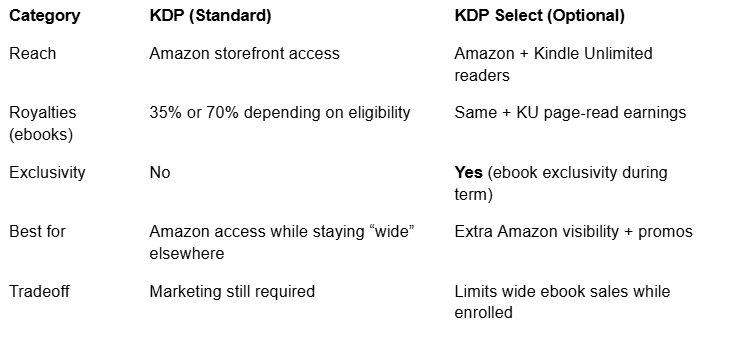
book platform and strength table

While DIY platforms offer control, full-service self-publishing providers appeal to authors seeking ongoing guidance and partnership, especially those publishing their first book.

Making the Final Decision: Finding the Best Fit

Choosing a trustworthy self-publishing service for your first book requires weighing all factors together. Authors should balance budget, desired level of involvement, and long-term goals when making a decision.

A simple self-assessment can help narrow options:

  • Do I want hands-on guidance or full independence?
  • Am I comfortable managing vendors myself?
  • How important is professional marketing and distribution support?

Reading author success stories and testimonials can provide reassurance and insight into real publishing experiences with different self-publishing companies.

Ultimately, patience, realistic expectations, and a commitment to quality and marketing are key drivers of long-term self-publishing success.

Frequently Asked Questions

How do I choose a trustworthy self-publishing service?

Evaluate self-publishing companies based on reputation, pricing transparency, contract terms, distribution quality, range of services, and author support. Research third-party reviews and author testimonials to verify claims made on company websites. The best self-publishing services provide clear information upfront and assign dedicated support to guide you through the process.

How can I ensure I retain full rights to my book?

Review contracts carefully to confirm you retain copyright ownership and control over distribution. Look for clear language about ISBN ownership, exclusivity terms, and your ability to terminate the agreement and move your book elsewhere. Trustworthy self-publishing companies make rights retention a priority.

What typical costs and royalties should I expect?

Costs vary widely based on services selected. Royalties typically range from 35% to 70%, depending on platform, format, and pricing strategy. Full-service self-publishing packages often include upfront fees but provide comprehensive support, while DIY platforms may have lower costs but require authors to source services independently.

How important is professional editing and design in self-publishing?

Professional editing and design are essential for producing a high-quality, competitive book. Readers judge books by their covers and quickly abandon poorly edited content. These investments directly impact reviews, sales, and your reputation as an author.

What are common warning signs of unreliable publishing services?

Hidden fees, vague contracts, poor communication, unrealistic marketing claims, and pressure tactics are red flags. Trustworthy self-publishing services provide clear pricing, transparent terms, and verifiable author testimonials.

What is the difference between full-service self-publishing and DIY platforms?

Full-service self-publishing provides comprehensive support, including editing, design, distribution, and a dedicated coordinator who guides you through each step. DIY platforms give authors tools to publish independently, but require managing each step alone, from hiring editors to uploading files to retailers. First-time authors often find full-service options less overwhelming.

How long does the self-publishing process typically take?

Timelines vary based on services selected and manuscript readiness. Full-service self-publishing typically takes 3-6 months from manuscript submission to publication, allowing time for editing, design, and production. DIY approaches depend entirely on the author’s pace and how quickly they can coordinate vendors and complete each step.

Should I use an aggregator or publish direct to retailers?

Aggregators simplify wide distribution by sending your book to multiple retailers through one upload, saving time and reducing complexity. Publishing direct to each retailer offers more control and sometimes higher royalties, but requires managing each platform separately. Many authors use a hybrid approach, publishing direct to Amazon while using aggregators for other retailers.

Dr. Kenneth Starkey’s Multiple Book Signings

Dr. Kenneth Starkey’s Multiple Book Signings

On Saturday, December 14, 2024, Dr. Kenneth Starkey held a book signing and meet & greet event for his recently published book, Indiana Boy: Memoir of a Psychologist, at the West Regional Mobile Public Library (Mobile, AL) Chapter Crafter’s Holiday Market.

Upcoming book signing events are also scheduled at Barnes & Noble Booksellers in Spanish Fort, AL, for Friday December 20, 2024 and Saturday December 28, 2024, and at Page and Palette Books in Fairhope, AL, in February 2025. All are invited to attend!

Photo of Ali Mazhin holding his book, The Running Journey

Update on the book signing on Friday, December 20, 2024, at Barnes & Noble in Spanish Fort, AL:

The event was successful, customer traffic was great, and 10 books were sold! He has another signing there on Saturday, December 28, 2024.

Photo of Ali Mazhin holding his book, The Running Journey

Leveraging Facebook for Authors: A Guide to Building Your Author Brand

Leveraging Facebook for Authors: A Guide to Building Your Author Brand

Image of Facebook like and love responses

In today’s digital age, social media has become a powerful tool for authors to connect with their audience, promote their work, and establish a strong author brand. Among the various social platforms available, Facebook remains one of the most popular and versatile options for authors to reach a broad audience. In this blog post, we’ll explore how authors can use Facebook to their advantage.

1. Create an Author Page

Start by creating a dedicated Facebook Author Page separate from your personal profile. This page will serve as your professional online presence. Use a professional headshot as your profile picture, and choose an engaging cover photo that reflects your genre or style of writing. Fill out the “About” section with a brief bio, contact information, and links to your website and other social media profiles.

2. Share Engaging Content

Regularly post engaging and relevant content that resonates with your target audience. This could include updates on your writing progress, book releases, author events, and behind-the-scenes glimpses into your writing process. Use a consistent posting schedule to keep your followers informed and engaged.

3. Build a Community

Encourage interaction with your followers by responding to comments, asking questions, and hosting giveaways or contests. Building a community around your work can lead to loyal readers eagerly anticipating your next release.

4. Use Facebook Groups

Join and actively participate in Facebook groups related to your genre or niche. These groups are excellent places to connect with readers who share your interests. Just be sure to follow group rules and avoid spamming with self-promotion.

5. Advertise Your Books

Consider using Facebook Ads to promote your books. You can target specific demographics, interests, and behaviors to reach your ideal readers. Create eye-catching ad graphics and compelling ad copy to entice users to click through and learn more about your books.

6. Live Video and Author Q&A Sessions

Facebook Live is a powerful feature for connecting with your audience in real time. Host live video sessions where you discuss your books, answer reader questions or share insights into your writing process. These sessions help build a personal connection with your readers.

7. Collaborate with Other Authors

Collaboration can broaden your reach—partner with fellow authors for joint promotions, author takeovers, or virtual book tours. Cross-promotion can introduce your work to new audiences.

8. Utilize Facebook Events

Create and promote virtual book launch events, author signings, or book club discussions on Facebook Events. These events can generate buzz and encourage readers to mark their calendars.

9. Track Your Analytics

Use Facebook Insights to track the performance of your posts and ads. Analyze the data to understand what type of content resonates most with your audience and adjust your strategy accordingly.

10. Stay Authentic and Engaged

Authenticity is key. Be yourself, and let your personality shine through in your posts and interactions. Consistently engage with your followers and promptly respond to messages and comments.

The Takeaway

Facebook can be a valuable platform for authors to connect with readers, promote their work, and build a strong author brand. By creating a dedicated Author Page, sharing engaging content, and actively engaging with your audience, you can harness the power of Facebook to enhance your author career. Remember, building a solid presence takes time, so be patient and persistent in your efforts.

Happy writing and connecting with your readers!


Congrats to Christina Bair, Our December Unboxing Contest Winner!

Congrats to Christina Bair, Our December Unboxing Contest Winner!

Cover of Yoga Who Yoga You by Christina Bair

Congratulations to Christina Bair, our December Unboxing Contest winner. Her book, Yoga Who Yoga You, will receive a video trailer. Check out the unboxing video HERE!

We love receiving our authors’ videos of them unboxing their books and promo items (thank you!). So, remember to capture the moment and send it to us when you receive your complimentary copies, bookmarks, posters, business cards, or invitation cards!

Then, email these short videos to your Publication Coordinator or socialmedia@pagepublishing.com. Please remember to include your name (or pen name) along with the title of your book in your video. Not only will these videos be shared on our Page Publishing social media pages, but authors will also be entered in a drawing for a chance to win a FREE video trailer for their book!

Limit one entry per month.

Drawings will occur monthly; 1 winner per month.